Documentation Index
Fetch the complete documentation index at: https://docs.boundless.network/llms.txt
Use this file to discover all available pages before exploring further.
- $ZKC is deployed on Ethereum Mainnet and Base Mainnet.
- $ZKC is also bridged to Taiko Alethia.
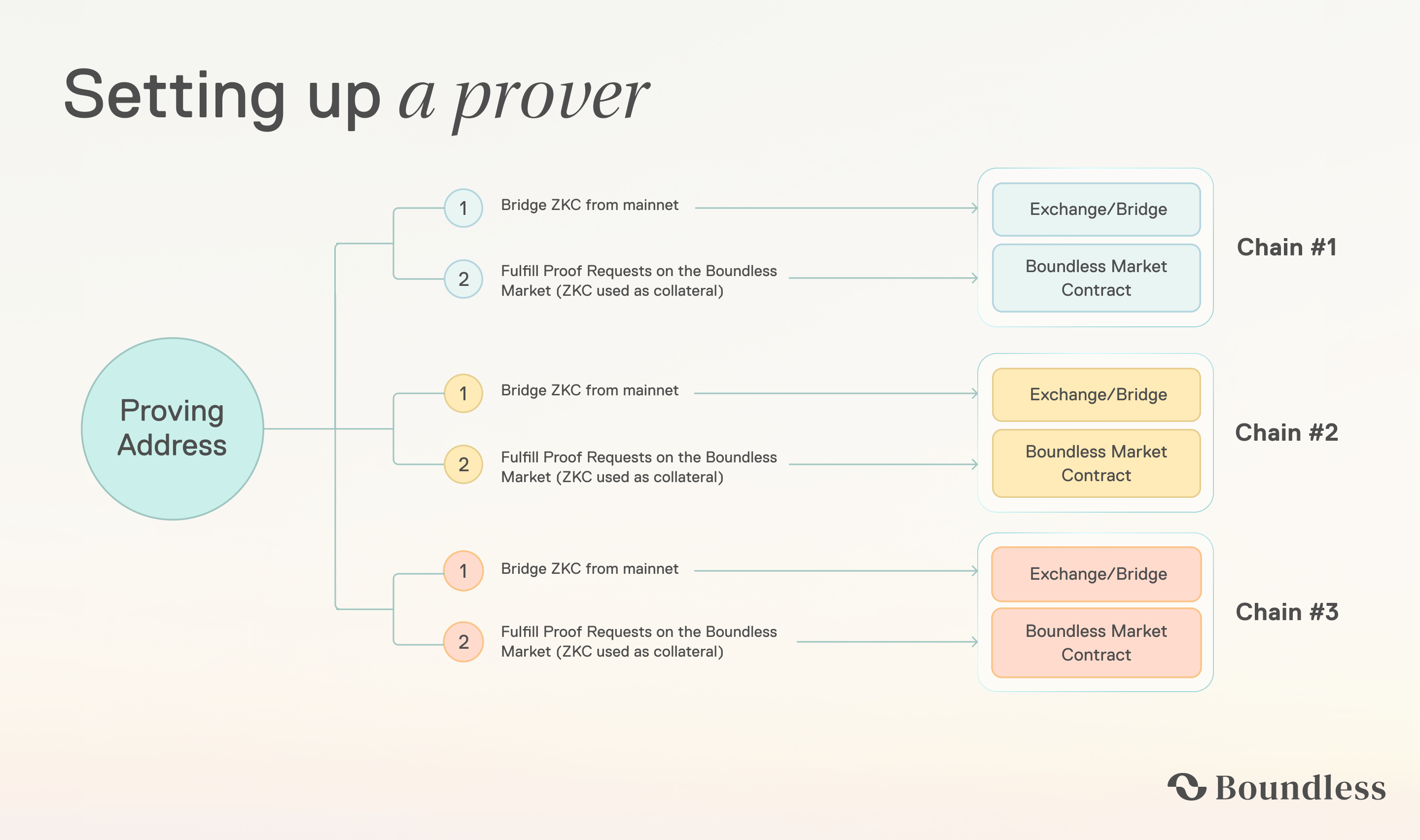
- To use $ZKC in the Boundless market as Proving Collateral on an L2, $ZKC must be bridged from Ethereum mainnet to that L2.
- Provers also need a small amount of native ETH on the destination L2 to pay for
depositCollateral and ongoing market interactions.
Bridging $ZKC
$ZKC is deployed at:
- Ethereum Mainnet:
0x000006c2A22ff4A44ff1f5d0F2ed65F781F55555
- (Bridged) Base:
0xAA61bB7777bD01B684347961918f1E07fBbCe7CF
- (Bridged) Taiko Alethia:
0xC284A781072442cC1882a8Db4573990B7B49DaC4
Bridging using Base’s Native Bridges
To bridge $ZKC from Ethereum mainnet to Base mainnet, see the Base documentation for bridging assets to Base.
Manual Bridging using cast
To start, make sure to have cast installed. This will require installing Foundry. Next, export the PRIVATE_KEY for the address holding the $ZKC tokens:
export PRIVATE_KEY=0x1234...5678
AMOUNT and ETH_MAINNET_RPC_URL environment variables:
export AMOUNT=10000000000000000000 # 10 ZKC
ETH_MAINNET_RPC_URL="https://"
cast send 0x000006c2A22ff4A44ff1f5d0F2ed65F781F55555 \
  "approve(address,uint256)" \
  0x3154Cf16ccdb4C6d922629664174b904d80F2C35 \
  $AMOUNT \
  --private-key $PRIVATE_KEY \
  --rpc-url $ETH_MAINNET_RPC_URL
cast send 0x3154Cf16ccdb4C6d922629664174b904d80F2C35 \
  "bridgeERC20(address,address,uint256,uint32,bytes)" \
  0x000006c2A22ff4A44ff1f5d0F2ed65F781F55555 \
  0xAA61bB7777bD01B684347961918f1E07fBbCe7CF \
  $AMOUNT \
  300000 \
  0x \
  --private-key $PRIVATE_KEY \
  --rpc-url $ETH_MAINNET_RPC_URL
Bridging using Taiko’s Native Bridge
Both $ZKC and native ETH are bridged through the same flow. To bridge from Ethereum mainnet to Taiko Alethia, see bridge.taiko.xyz and Taiko’s contract documentation. The Taiko relayer mints the bridged tokens on L2 a few minutes after L1 confirmation.
Manual Bridging to Taiko using cast
To start, make sure to have cast installed. This will require installing Foundry. Next, export the PRIVATE_KEY for the address holding the $ZKC tokens:
export PRIVATE_KEY=0x1234...5678
AMOUNT, RECIPIENT, FEE, and ETH_MAINNET_RPC_URL environment variables:
export AMOUNT=10000000000000000000 # 10 ZKC
export RECIPIENT=0xYour...Address  # L2 recipient and refund address
export FEE=100000000000000         # 0.0001 ETH processing fee
ETH_MAINNET_RPC_URL="https://"
ERC20Vault to spend $AMOUNT tokens:
cast send 0x000006c2A22ff4A44ff1f5d0F2ed65F781F55555 \
  "approve(address,uint256)" \
  0x996282cA11E5DEb6B5D122CC3B9A1FcAAD4415Ab \
  $AMOUNT \
  --private-key $PRIVATE_KEY \
  --rpc-url $ETH_MAINNET_RPC_URL
ERC20Vault.sendToken. The L2 gasLimit must be at least 1,000,000:
cast send 0x996282cA11E5DEb6B5D122CC3B9A1FcAAD4415Ab \
  "sendToken((uint64,address,address,uint64,address,uint32,uint256))" \
  "(167000,$RECIPIENT,$RECIPIENT,$FEE,0x000006c2A22ff4A44ff1f5d0F2ed65F781F55555,1000000,$AMOUNT)" \
  --value $FEE \
  --private-key $PRIVATE_KEY \
  --rpc-url $ETH_MAINNET_RPC_URL

